
Running Meta ads for the first time feels like sitting in the cockpit of a plane you’ve never trained on. There are dashboards everywhere, settings that seem to matter, and a quiet fear that one wrong click is going to cost you money with nothing to show for it.
I’ve been there. When I started learning this platform I made every beginner mistake available, wrong account structure, broken tracking, campaigns that never exited the learning phase, money spent on audiences that had no business seeing my ads. It took longer than it should have to find a system that actually made sense.
What follows is that system, laid out from the beginning. This Meta ads guide does not try to cover every feature the platform offers, because most of them you don’t need yet. It covers the core sequence that separates advertisers who get consistent results from those who keep experimenting without direction.
It is a Meta ads guide for beginners, written for anyone with zero or limited experience. If you’ve boosted a post and wondered why it didn’t work, if you’ve opened Ads Manager and closed it again because it was overwhelming, or if you’ve run a campaign or two but couldn’t explain why it performed the way it did, this is where to start.
The path goes from account setup to tracking to campaign structure to creative to optimization and finally to scaling. Each step depends on the one before it. Skipping ahead is how most people end up stuck.
What Meta ads actually are (and why they’re different from boosted posts)
The first thing worth clearing up is the difference between a Meta ad and a boosted post. Meta doesn’t make this easy to understand, the platform actively encourages you to boost posts because it’s simple and generates revenue. But boosting a post and running a proper Meta ad campaign are not the same thing and treating them as interchangeable is one of the most common early mistakes.
A boosted post starts with content you’ve already published on your Facebook or Instagram page. You hit a button, set a budget, pick a rough audience, and Meta shows that post to more people. The process takes about two minutes. What Meta optimizes for in that process is almost always engagement, likes, comments, shares. That might feel good but engagement doesn’t equal revenue.
A Meta ad campaign built inside Ads Manager is a different system entirely. You start by choosing a campaign objective: sales, leads, traffic, video views, app installs. That objective is the instruction you give Meta’s algorithm. When you choose “sales” and connect it to a purchase event on your website, Meta goes looking for people who are most likely to buy from you. That’s a fundamentally different job than finding people who’ll double-tap a post.
From there you control targeting at a much deeper level. Custom audiences built from your website visitors. Lookalike audiences modeled on your existing buyers. Broad targeting that lets Meta’s machine learning find buyers you wouldn’t have thought to target yourself. You test multiple creative variations simultaneously. You get detailed reporting that tells you what’s working and why.
The practical gap between the two is significant. Boosting is spending money without building data. Running real campaigns through Ads Manager means every dollar you spend teaches the algorithm something useful about your audience. That learning compounds over time.
For anyone serious about using this platform to grow a business, understanding the real difference between Meta ads and boosted posts is the first mental shift that needs to happen.
How to set up Meta Business Manager the right way
Before you build a single campaign you need the foundation underneath it to be solid. That foundation is Meta Business Manager, the central hub where all your advertising assets live together.
Most beginners skip this step or rush through it. They go straight to Ads Manager because that’s where the ads are and Business Manager feels like paperwork. That shortcut creates problems that are annoying to untangle later: permission errors, disconnected assets, billing issues, access chaos when you add a team member or work with a contractor.
Business Manager is where your Facebook page, Instagram account, ad account, pixel, and team members all live. Get it right once and everything downstream becomes easier. The key steps: create the account under a real admin profile, connect your Facebook page as owner (not just as a page admin), set your ad account timezone and currency correctly, these can’t be changed later, and connect your Instagram account for full placement control.
Permissions matter more than most people realize. Meta’s own instructions for verifying your business in Business Suite are worth following early, because verification unlocks features you will want later. Give team members exactly the access their role requires and nothing more. When someone leaves removing their access cleanly is much easier when the structure was set up right from the start.
The full process of setting up Meta Business Manager correctly is worth the hour it takes, because a shaky base makes every campaign harder than it needs to be.
Meta pixel installation: how to track conversions without breaking your data
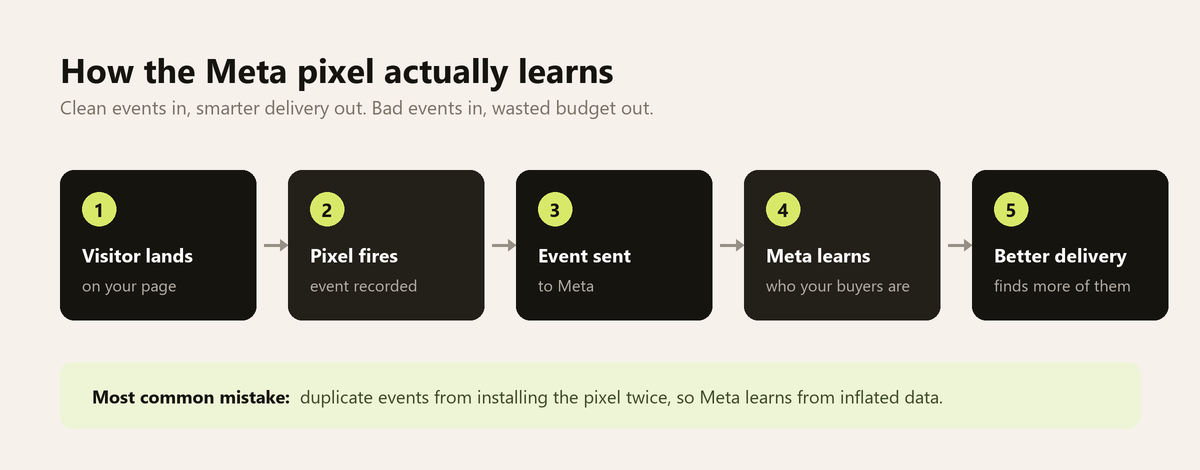
Once your Business Manager is set up the next thing that needs to work correctly is your tracking. Specifically your Meta pixel. This is the piece most beginners either skip entirely or install incorrectly and it’s the one that costs them the most money quietly over time.
The pixel is a small JavaScript snippet that lives in your website’s header. Every time someone visits a page it fires and sends a signal back to Meta. When someone makes a purchase, submits a lead form, or adds something to their cart, those are events. Meta collects those events and uses them to understand who your buyers are and how to find more of them.
When the pixel works correctly your campaigns get smarter over time. When it’s broken or firing duplicate events your campaigns are learning from bad data. The algorithm still optimizes, it just optimizes toward the wrong people.
Meta publishes the full pixel reference with every standard event, and it is worth checking which events your business actually needs before you install anything. The two main installation methods are direct (pasting code into your site header) and Google Tag Manager. GTM is the better approach for most setups, it’s cleaner, easier to maintain, and much easier to debug when something goes wrong.
Always verify before you spend. The Meta Pixel Helper Chrome extension shows you in real time whether your pixel is firing correctly. Walk through your own checkout process and watch every event fire at the right moment before launching any conversion campaign.
The complete process of installing your pixel cleanly and verifying every event is what makes the rest of your advertising investment worth making.
Meta ads campaign structure: the setup that actually scales
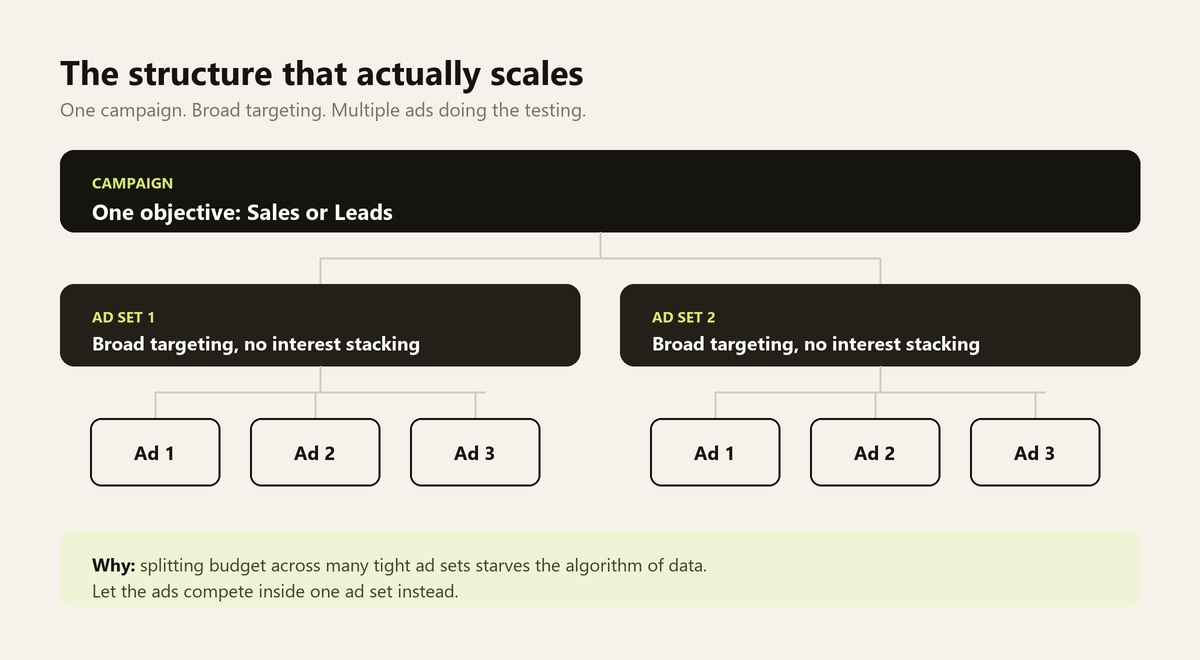
With your Business Manager configured and your pixel firing cleanly you’re ready to build campaigns. This is where most people make their second round of expensive mistakes, not because Ads Manager is complicated but because the conventional wisdom about campaign structure is mostly outdated.
The instinct when you first open Ads Manager is to control everything. Separate ad sets for each audience segment. Different budgets for different interests. Tight demographic targeting layered with behavioral filters. It feels strategic. In practice it starves the algorithm of the data it needs to work.
The approach that performs consistently now is simpler than most people expect. One campaign. One or two ad sets with broad targeting. Multiple ad variations inside each ad set. That’s it to start.
At the campaign level choose your objective based on what you actually want, for direct response almost always “Sales” with website purchase as the conversion event. Enable Advantage Campaign Budget. At the ad set level go broad: minimal audience restrictions, let Meta find the buyers using its own signals. At the ad level put your energy into three to five meaningful creative variations. Running them together inside one ad set is the cheaper way to get results, but it is not a test, because Meta will feed one of them far more budget than the rest. When the question you need answered is which creative actually won, give every ad its own ad set with an equal budget.
The counterintuitive thing about simplifying your structure is that it gives you more insight not less. Better structure means cleaner data. Cleaner data means better decisions. The full logic behind a campaign structure built to scale without fighting the algorithm comes down to giving Meta the right objective, enough budget to learn, and enough creative to work with.
How to write Facebook ad copy that stops the scroll
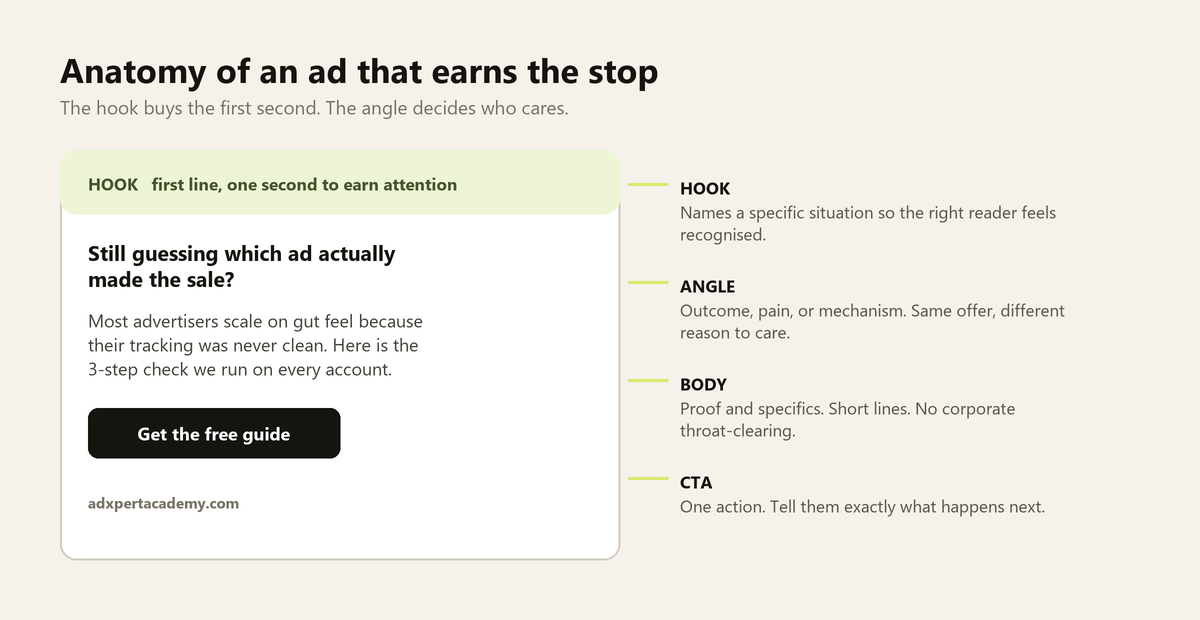
You can have a clean account structure, a correctly installed pixel, and a well-built campaign, and still get ignored. Because none of that matters if the ad itself doesn’t earn a stop.
The hook is the first line of your primary text. It’s what people read in that first second before they decide whether to keep going or scroll past. A good hook names a specific situation that makes the right reader feel immediately recognized, makes a claim that’s specific enough to feel credible, or opens a question the reader wants to resolve.
The angle is the specific lens through which you’re presenting your offer. Different people have different reasons to care about the same product. The outcome angle focuses on what life looks like after. The pain angle focuses on the frustration before. The mechanism angle focuses on what’s different about your approach. Each angle is a different ad, run them simultaneously and let Meta match the right message to the right person.
Body copy should be short paragraphs, specific claims, and a call to action that matches the temperature of your audience. Cold traffic needs a softer ask. Warm retargeting audiences can handle something more direct.
The full framework for writing ad copy that earns the stop and converts the click comes down to understanding that creative is not decoration, it’s the primary signal Meta uses to find the right person for your offer.
How to read Meta ads data and scale what’s working
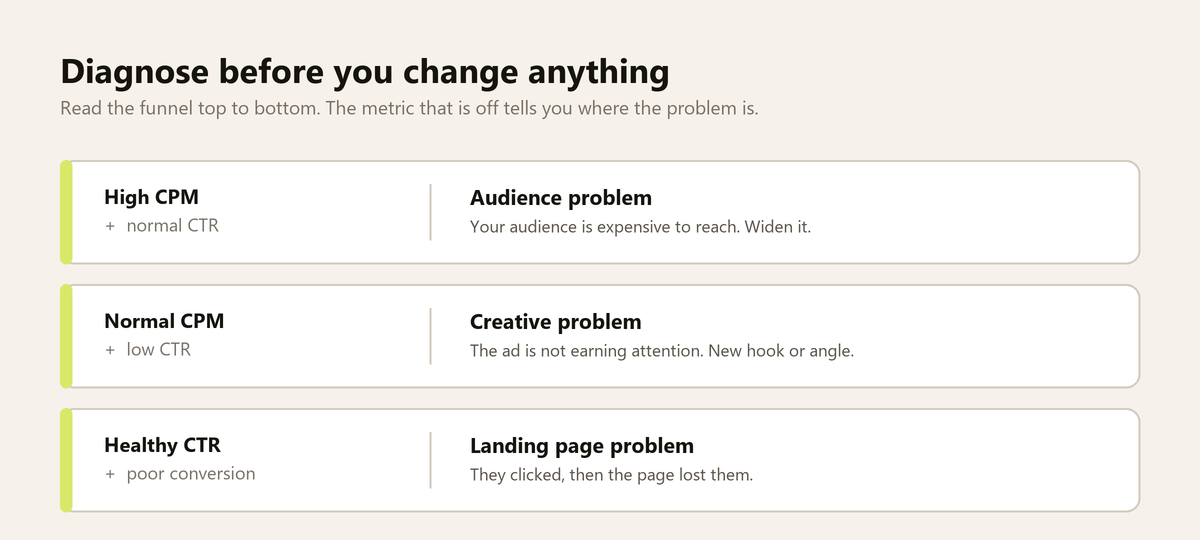
Getting a campaign to profitability is one problem. Knowing what to do next is another.
The metrics that actually matter at the start are a short list. Cost per result is your primary indicator, know your maximum acceptable cost before you launch and use that as your decision boundary. ROAS matters if you’re running e-commerce. Click-through rate tells you whether your creative is earning attention. Frequency tells you about saturation. CPM tells you how expensive your audience is to reach.
When results aren’t where you want them diagnose the funnel from top to bottom before changing anything. High CPM with normal CTR is an audience problem. Normal CPM with low CTR is a creative problem. Healthy CTR with poor conversion rate is a landing page problem.
For scaling: increase budget by no more than 20 to 30 percent at a time. Wait three to five days to stabilize, because a large change pushes the ad set back into the learning phase, which is the single most common cause of the performance dip people blame on scaling. If performance holds increase again. If you need to scale faster duplicate the ad set at the new budget rather than editing the existing one.
The full process of reading your data correctly and scaling spend without watching ROAS collapse is where the real long-term advantage in Meta advertising gets built.
Where to go after this Meta ads guide
The path from zero to a consistently profitable Meta ads account is not complicated. It’s sequential. Each piece in this Meta ads guide depends on the one before it and shortcuts at any stage create problems that compound quietly until they’re hard to ignore.
A clean Business Manager means your assets, permissions, and billing are stable. A correctly installed pixel means your campaigns learn from accurate data instead of noise. A consolidated campaign structure means the algorithm has what it needs to optimize without being starved of information. Strong creative gives Meta the material to match the right message to the right person. And reading your data clearly means you make decisions based on evidence rather than reacting to daily variance.
None of this requires a big budget to start. It requires doing the foundational steps in the right order and resisting the urge to skip ahead.
If there’s one place to focus your attention first, before campaigns, before creative, before anything else, it’s making sure the tracking foundation is airtight. Everything downstream depends on the quality of the data flowing into your account. Getting your Meta pixel installed and verified correctly is the single step that pays the most dividends across every campaign you run from that point forward.